


Players don't stop caring about their progress when they close the game. Between sessions, they check their rank, compare results with friends, and look at how their rating has changed.
I've always liked giving players a way to explore those statistics outside the game. A companion dashboard gives them somewhere to revisit a good run and see how it affected their season.
Imagine finishing a ranked match, closing the client, and wanting to know what actually changed. Did your rating move much? How has it changed since the season started? Who's immediately above or below you?
Your game may already calculate some of that data. In this tutorial, I'll use AccelByte Gaming Services (AGS) to build a small web companion for Signal Run, a fictional competitive game. We'll read current stats and season rank from AGS, then add a progression graph and a list of best runs using game-owned records in Cloud Save.
What We're Building
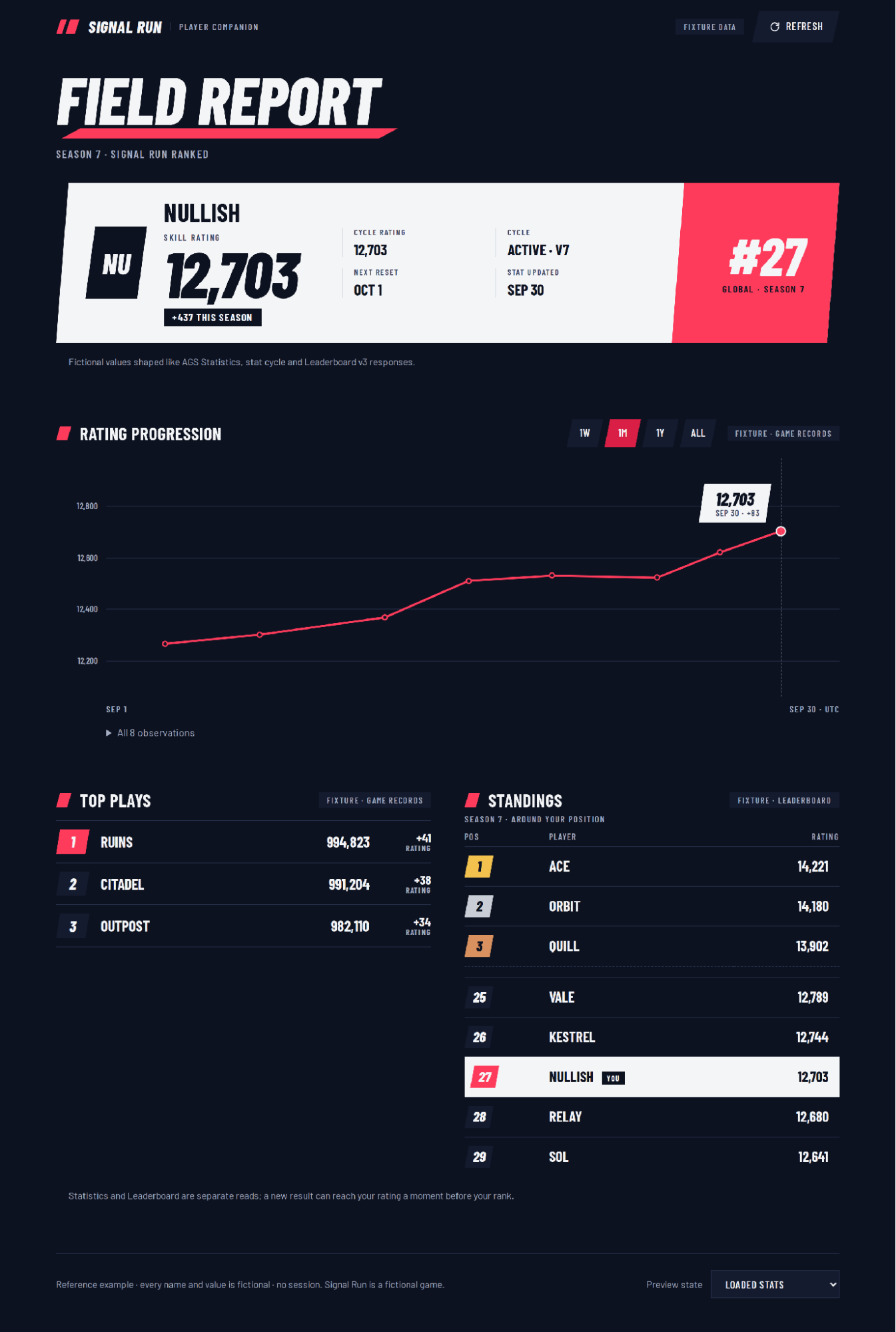
Our fictional player, Nullish, has a skill rating of 12,703. That number is useful, but it gets more interesting with context: +437 points since the start of Season 7, global rank #27, the observations behind that change, and a few top runs. A number tells players where they are. History tells them how they got there.
You can follow along with the reference project on GitHub. It has a fixture mode with fully fictional sample data, so you can inspect the dashboard without an AGS account. In AGS mode, it reads from your own game namespace.
How the Services Fit Together
There are three sets of player data here, and each comes from a different place.
Statistics holds the current skill-rating value and the values associated with its cycle. The same stat can also feed matchmaking rules, Achievements, or Rewards. The trusted game server calculates it; the companion only reads it.
Leaderboard uses statistic update events to sort players and answer a different question: how do I compare with everybody else? We'll use a v3 cycled leaderboard to show the player's rank within the current competitive period.
Cloud Save holds the things a current statistic cannot reconstruct: earlier rating snapshots and the player's best runs. The trusted game server writes these as private, server-owned player records; the companion reads them with the player's session.
I keep the responsibilities separate. The game backend owns the rating calculation and all writes. LiveOps owns the cycle schedule and leaderboard configuration. The website renders data that the signed-in player is allowed to read.
Figure 2. Anas's original reference architecture, using a same-origin companion proxy. With the newer Allowed Origins (CORS) configuration, the proxy is optional for supported browser calls.
One change worth calling out: the reference app was originally written around a small proxy because browser requests from AGS Public Cloud could be blocked by CORS. AGS now supports self-service Allowed Origins (CORS) configuration on Public Cloud and Private Cloud. For a direct-browser deployment, add the exact website origin (including your localhost port during development) under Foundations → Tools and Utilities → Allowed Origins (CORS). A proxy is still a valid architectural choice, but you no longer need one solely to get around CORS. Confirm the required routes and request headers work in your namespace.
Set Up One Statistic, One Cycle, and One Leaderboard
Before wiring up the UI, I'd configure the data model and test it with one account:
-
Create a skill-rating statistic (for example,
skill-rating) and allow rating updates only from the trusted game backend. -
Attach the statistic to a cycle that represents the season. Use that same cycle for a v3 descending leaderboard, such as
skill-rating-season. -
Use a public IAM client for player-scoped API calls. Keep confidential client secrets and administrator credentials out of the browser.
-
Have the game server record a season-opening rating, rating snapshots, and best runs as private Cloud Save player records with
set_by: SERVER.
See the Statistics cycle guide, cycled-leaderboard setup and Cloud Save private player-record documentation for the setup details.
The update strategy matters here. An absolute rating written with OVERRIDE isn't the same as a score accumulated using INCREMENT. And a cycle value is not automatically how much rating the player gained during a season. Our +437 number is 12,703 minus a separately recorded season-opening rating of 12,266.
Initialize the TypeScript SDK
The example is built with Vite and TypeScript. It pins @accelbyte/sdk 4.3.4, @accelbyte/sdk-iam 6.3.7, @accelbyte/sdk-social 6.3.7, and @accelbyte/sdk-leaderboard 5.3.7. The packages are versioned separately, so their numbers don't have to match. The SDK gets its public connection settings from the project's environment configuration:
export function createSdk(config: DashboardConfig) {
  return AccelByte.SDK({
    coreConfig: {
      baseURL: config.baseURL,
      namespace: config.namespace,
      clientId: config.clientId,
      redirectURI: config.redirectURI
    },
    axiosConfig: { request: { timeout: 15_000 } }
  })
}
Here, baseURL points to the AGS deployment when the browser calls AGS directly, or to your own origin when you intentionally use a proxy. The SDK adds the service paths. namespace identifies your game, and clientId identifies the public IAM client.
For sign-in, use a player authentication flow appropriate to your game and the web: redirect-based authorization with PKCE where supported, including your required MFA or platform-account steps. The TypeScript SDK documentation includes an authorization-code client example. The GitHub dashboard sample currently uses a custom email/password flow for demonstration; it doesn't implement the complete production sign-in experience. I would replace that part before launching a player-facing site.
Read the Player's Current Rating and Cycle
Once the player is signed in, I start with UsersApi(sdk).getUsersMe_v3() to identify them.
The loader then requests the player's current stat, the active cycle configuration, that player's cycle-stat value, and the Cloud Save records. These are independent reads, so the example loads them together:
const [statResponse, cycleResponse, cycleStatResponse, recordsResponse] =
  await Promise.all([
    UserStatisticApi(sdk).getUsersMeStatitems({
      statCodes: [config.statCode], limit: 1
    }),
    StatCycleConfigurationApi(sdk).getStatCycle_ByCycleId(config.cycleId),
    UserStatisticCycleApi(sdk).getStatCycleitemsMeUsers_ByCycleId(
      config.cycleId, { statCodes: [config.statCode], limit: 1 }
    ),
    PublicPlayerRecordApi(sdk).createUserMeRecordBulk({
      keys: [recordKeys.history, recordKeys.runs]
    })
  ])
With these pinned SDK versions, the response wrapper has a data property containing the service payload. I select the statistic by statCode, read value for the rating, and use updatedAt for the last change. If there's no item yet, the dashboard says "Unrated" rather than showing an invented zero.
The cycle metadata includes its status and currentVersion. The cycle-stat item carries cycleVersion, so I only show it as the current season value when those versions agree. That guards against displaying an old period's value under a new season heading.
Show the Player's Leaderboard Neighborhood
The per-user leaderboard lookup gives us the player's rank. For a cycled leaderboard, the response may contain more than one ranking, so I select the cycle we configured:
export function selectCycleRanking(response: UserRankingResponseV3, cycleId: string) {
  const ranking = response.cycles.find(cycle => cycle.cycleId === cycleId)
  return ranking && !ranking.hidden && ranking.rank >= 1
    ? { rank: ranking.rank, point: ranking.point }
    : null
}
Then I request the five positions around that rank. For someone ranked #27, that means positions 25–29:
const offset = Math.max(0, (ranking?.rank ?? 1) - 1 - 2)
const { data } = await leaderboard.getCycle_ByLeaderboardCode_ByCycleId_v3(
  config.leaderboardCode,
  config.cycleId,
  { offset, limit: 5 }
)
The row data gives us userId and point, but not a rank field. So I calculate the displayed row position from offset + index + 1. I also load the first three rows when the neighborhood starts lower down the list. That lets the dashboard show both the podium and where the player sits without dumping an entire global leaderboard.
For display names, this example reads displayName from the latest statistic update's additionalData. It's a snapshot, which means a player's new name appears after their next update. If the name is missing, the row says "Unnamed player." Hidden or unranked players get an explicit empty state.
One small thing I surface in the UI: Statistics and Leaderboard are separate reads. An event can update the rating before the leaderboard catches up, so a player may briefly see a newer rating than rank.
Build the Progression Graph from Saved Observations
This was the part I didn't want to gloss over. Statistics updatedAt tells us when the current value last changed. It doesn't give us every earlier value to plot. A cycle statistic is a value for a period, not a daily history feed. And the previous-cycle leaderboard read isn't a general historical query.
So, after each rated match, the trusted game server records a rating observation in Cloud Save. A trimmed example of the rating-history player record looks like this:
{
  "season": {
    "cycleId": "a79ab356f61a49b9bdbc87e009e5c134",
    "cycleVersion": 0,
    "startValue": 12590
  },
  "snapshots": [
    { "timestamp": "2026-09-29T20:05:00Z", "value": 12671 },
    { "timestamp": "2026-09-30T01:40:00Z", "value": 12712 }
  ],
  "__META": { "set_by": "SERVER", "is_public": false }
}
A second player record, best-runs, holds the arena, score, and rating change for each notable run. The dashboard reads both records with the player's own token, but it never has permission to rewrite them.
The season-opening rating is important. In the Cloud Save example above, 12,712 minus 12,590 is a gain of 122 points. That's separate illustrative data from the fixture screenshot's +437. I only calculate a gain when the record's cycle ID and version match the currently displayed period. After a reset, the UI waits for a new baseline instead of silently comparing values from two seasons.
For the graph, I keep the model simple: each point has a timestamp and a value. The 1W, 1M, 1Y, and All controls filter those observations. I position points by elapsed time, so a day and a month don't occupy the same horizontal distance. One observation draws a point; no observations draws an honest empty state. For long histories, trim old snapshots or downsample the record instead of letting one Cloud Save payload grow without limit.
Bring It Together, Then Try It Yourself
The final page starts with identity, rating, season change, and rank, then moves into the progression chart, best runs, and standings. On a narrow screen the sections stack and the chart resizes. The fixture view makes this easy to try without configuring AGS, while live mode reads the player's actual namespace data.
I also made the failures part of the design rather than something to deal with later. A new player sees "Unrated" and "Unranked." A missing history record gives them an empty graph, an expired session asks them to sign in again, and a rate-limited read offers a retry later. None of those states should pretend the player has a rating they don't.
The full Vite/TypeScript project—including fixture mode, configuration, the SVG chart, and the data loader—is in the example repository. Start with fixture mode to get a feel for the UI. Then configure a statistic, a cycle, a v3 leaderboard, and server-owned Cloud Save records in your namespace. Use the code and README as a reference, while reviewing the sample's demo-only sign-in before adopting it in production.
Start with One Statistic and One Cycle
You don't need a big player portal to make this useful. Start with a value players already understand, give it a cycle and a rank, and decide which moments from gameplay are worth recording. The first version might only show a rating and a short history. Previous-season comparisons, richer match history, or shareable profiles can come later.
For me, the interesting part is that most of the underlying data already exists in the game. The companion just gives players somewhere to make sense of it when they're not playing.
Your Backend Already Has the Data. Put It to Use.
Your game already tracks player stats, rankings, and progression. Why not make that data available outside the game, too? With AGS, you can pull player stats, query leaderboards, and store progression history using existing backend services and SDKs. Build your own companion dashboard, player profiles, or whatever fits your game without having to build and maintain those backend systems yourself.
You can get started on AGS Public Cloud for free, build and test your integration, and only start paying once your game grows beyond 30 concurrent users.
You're almost signed up!
Verify your account by following the instructions sent to .
If you still haven't received an email, please check your spam folder.
Featured Blog Posts



Bring your first player online today.
Get started for free, and scale as your game grows.